Editing video using still photos

Recently, there was controversy about a doctored photograph showing four Iranian missiles launching, whereas the original apparently showed three and one on the ground. Errol Morris discussed the images on the website of the New York Times.

Photo and video editing are nothing new, but some new software seeks to make the former much easier. It combines video data with that from still photographs in order to accomplish many possible aims. For instance, it could be used to improve the resolution of a whole scene or elements within it. It could also correct for over- and under-exposed regions. Of course, it could also facilitate video manipulation. The skills and software required to edit still images are increasingly available. Combine that with this software and you could empower a slew of new video fraudsters.

It will be interesting to see what kind of countermeasures emerge from organizations concerned about data integrity. One route is forensic – identifying markers of manipulation and tools for uncovering them. Another relies on requiring technologies and techniques for those capturing and submitting video. That could involve the expectation of multiple independent photos and videos produced from different angles using different equipment, or perhaps the widespread deployment of timestamps and cryptographic hashing to strengthen data integrity.

Online climate calculators

Here are two neat online climate-related calculation systems:

The first is provided by the American Environmental Protection Agency and allows for various kinds of conversions. You can work out what a volume of one greenhouse gas would be equivalent to in another gas; you can also look at a set quantity of carbon dioxide emissions as being equivalent to certain number of barrels of oil, homes heated for a year, etc.

The second site – RoofRay – lets you draw solar panels on top of buildings using the satellite photos in Google Maps. It then tells you how much it would cost to cover that area with panels, how much energy it would produce, and how long the system would take to pay off its own costs.

Backing up GMail

A recent Slashdot post raised a good question: Google Has All My Data – How Do I Back It Up?

I am a pretty determined Google user myself. While I have abandoned Blogger for WordPress and never much liked Picasa, I do have a pretty packed Google Account: Alerts, Analytics, Book Search, Calendar, Custom Search, Docs, GMail, Groups, iGoogle, Talk, Web History, and Webmaster Tools are all used to differing degrees. The bolded items, I would definitely mourn if lost.

Backing up most data fed to Google is probably best done by retaining the copy you had before you uploaded one to their system. That works well enough in the case of photos and MS Office documents. It doesn’t work with emails, however. This is annoying, because they are probably the most important and irreplaceable thing most people have entrusted to Google.

Thankfully, backing up your GMail is a relatively simple process. Start on a computer that (a) you already have a regime for backing up itself and which (b) has adequate hard drive space to store all your Google Mail. Then, follow these steps:

  1. Log into GMail
  2. Click ‘Settings’
  3. Click ‘Forwarding and POP/IMAP’
  4. Click the button beside ‘Enable POP for all mail’
  5. Configure a mail application like Outlook or Thunderbird to access the POP version of your GMail account.
  6. Watch all your messages move from Google’s ‘cloud’ to your hard drive

My GMail archive is an extremely valuable collection of data, greatly improved by the ability to search through it with ease. That functionality doesn’t carry over to the backup, but I do feel more at ease knowing that in the event of one of their data centres burning down (with no working backup tapes to recover from), I won’t have lost the messages forever.

Human Health in a Changing Climate

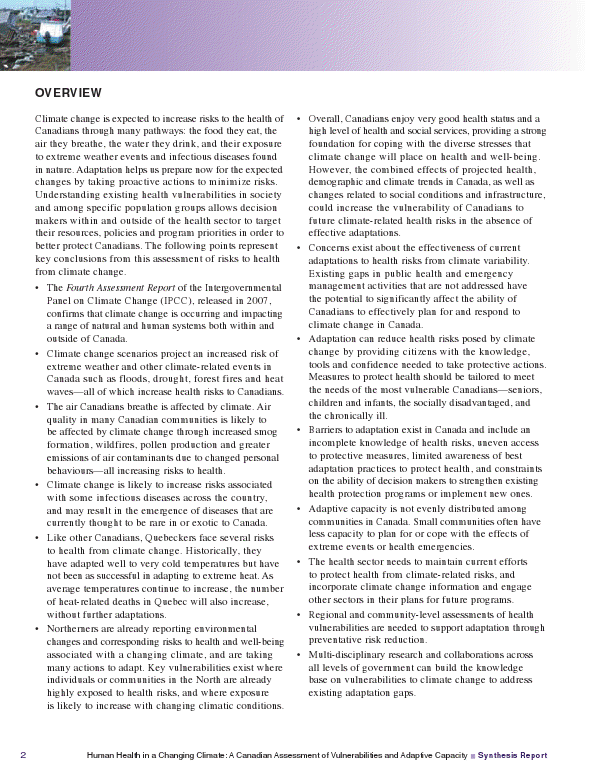
Health Canada has followed up the climate change impact assessment carried out by Natural Resources Canada with a report of their own: Human Health in a Changing Climate: A Canadian Assessment of Vulnerabilities and Adaptive Capacity. For some bizarre reason, they have decided not to post it on their website. Rather, it is available through email upon request. To simplify matters, here it is:

When I have the chance, I will merge them all into one file and post it.

[Update: 19 August 2008] Here is the whole thing as one 9 megabyte PDF: Human Health in a Changing Climate: A Canadian Assessment of Vulnerabilities and Adaptive Capacity.

[Update: 1 January 2012] Here is just the overview page as an image file.

Passphrases should be universal

One of the most annoying things about maintaining good password procedures is the fact that various places have different requirements. Some sites I use require one capital letter and one special character (100%Beef!), whereas others forbid special characters but require numbers. Many places have minimum password lengths, while a few especially annoying ones have relatively short maximum password lengths. Relatively few permit you to use a passphrase.

The best option would be to permit an unlimited string, including whatever punctuation and special characters are desired. Using a string basically foils brute force attacks, as the result of the sheer number of combinations. A hardcore password like “Sz5XULBKwPtI” is probably no more secure (and certainly much less memorable) than a custom phrase like: “The thing I most enjoyed about Paris, France was having picnics in the evenings.” Even if you only permit letters and numbers, each additional character increases the maximum possible length of a brute force search by a factor of 36: 62 if the passphrase is case sensitive.

Attacks not based on brute force (such as those where keystrokes are logged or passwords are otherwise intercepted) can naturally be carried out regardless of the strength of the password itself. What a passphrase system would allow is a high degree of security along with lessened requirements for obscure memorization. All it would take is a few minor code changes here and there, after all.

Improvement to GMail security

Array of cheeses

Much to my delight, GMail has added an ‘Activity on this account’ feature. It is located down at the bottom of the inbox page, where it lists the time of last account activities. Clicking ‘Details’ leads to a pop-up showing the last five instances of account access, the form of access (browser, POP, IMAP, etc), and the IP address.

This is a big security advance. Previously, anyone who knew your GMail password could access your account at will, with no way for you to know. They could even be logged in at the same time as you, with no sign on your machine that this was happening. This is also addressed by the new feature, which includes an option to log out all other accounts.

GMail users should definitely take a peek at this information from time to time, especially if they are in the habit of using their account from shared or public computers. Given (a) how much information the accounts store and (b) how easily searchable they are, any attack that gains access to your GMail account could have serious consequences.

WiFi wars

The present situation in my flat is a classic failure of coordination. There are so many (encrypted) wireless networks operating that interference seems to have become a major issue. Internet access has become slow and unreliable. Of the eleven channels in the 802.11b/g standard, only three (1, 6, and 11) are fully non-overlapping. The individual wireless access points are all interfering with one another, as well as with everything else that operates in the same part of the radio spectrum: microwaves, 2.4 GHz cordless phones, security cameras, Bluetooth devices, baby monitors, wireless video game controllers, fluorescent lights, etc, etc. Indeed, a new phone somewhere in my vicinity may well have been the straw that broke the camel’s back, as far as the 2.401 MHz to 2.473 MHz range goes.

Everyone would have faster and more reliable internet access if we could shut down all but a couple of the access points. Unfortunately, there is no way to coordinate such an action. Furthermore, anyone who actually ran one of the reduced number of access points, if such an agreement could be reached, would be faced with the same kind of illicit usage that forced me to shut down my open network.

One option is to seek a technological fix, in the form of 802.11a or 802.11n equipment that is less likely to be interfered with by existing devices. Of course, given enough time, those devices are likely to face similar hurdles.

Re-encrypting WiFi

Unfortunately, I had to shut down my open wireless network experiment. That is because I found three people within the span of two days who were both (a) criminal and (b) very stupid.

One thing to remember: if you are going to use open wireless networks to download illegal things, make sure you aren’t sharing your entire hard drive in read/write mode. Not only will the person running the network get wise to you without even needing to sniff packets, they will be able to remotely eliminate your ill-gotten files before banning you from the network. If they were so inclined, they could do much worse things to you.

I suppose I could set up a captive portal system using something like ZoneCD – thus providing scope for well behaved neighbours and passers by to use the network. That would, however, require acquiring and setting up a computer between my DSL modem and WAP. Since the two are presently integrated, the expense and bother would be even greater.

As is so always the case, a few bad apples have made it necessary to discontinue a good thing.

Who are you really talking to?

Bruce Schneier has an interesting post about man-in-the-middle attacks. These are situations in which party A and party B are trying to exchange sensitive information privately (for instance, credit card numbers or orders for moving hostages) without realizing that party E is in between them, pretending to be party A to party B, and vice versa.

The attack model has been mentioned here before in the context of cellular phones. It is rather more interesting in the context of the Betancourt rescue from the FARC.